nvk_THEME
A modern, customizable Reaper theme with automatic track coloring
Designed by Gwen Terrien to match the nvk.tools scripts, with track FX, transport, and channel output buttons, a settings script, and a script that colors tracks by folder.
Purchases go through Gumroad.com
- 14-day trial, no card needed
- Settings and track color scripts
- Updates through ReaPack
- macOS & Windows, Reaper 7+
- Multi-user licenses available
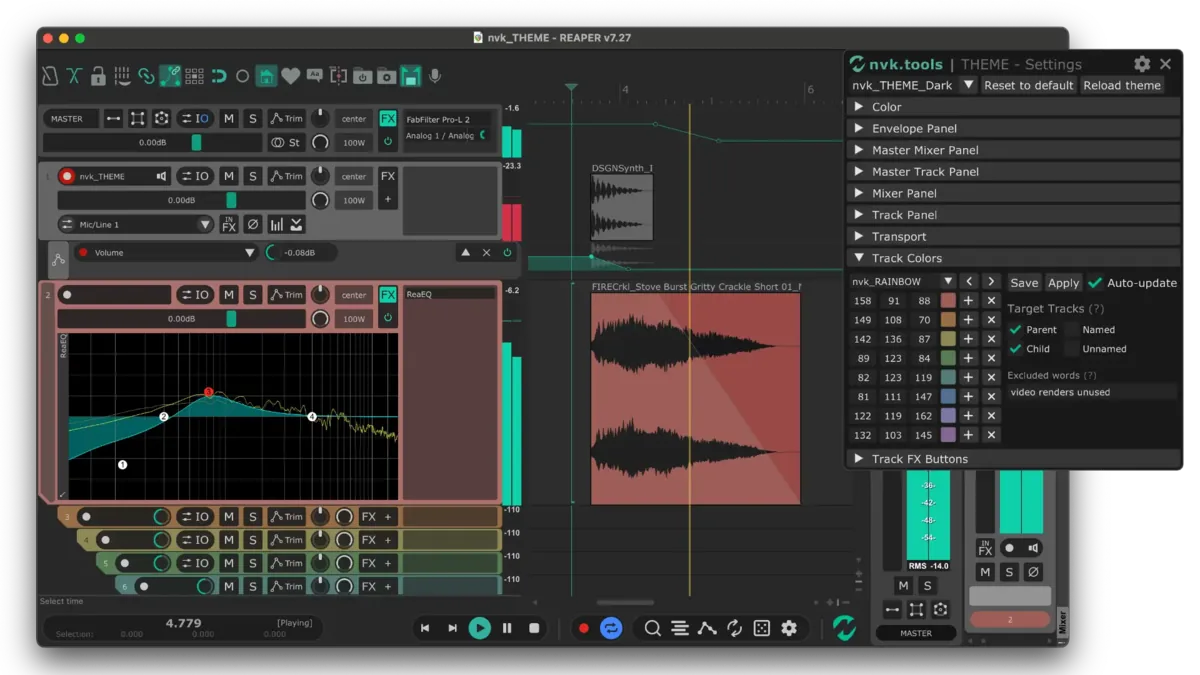
In Reaper
A project in nvk_THEME, with the settings script open.
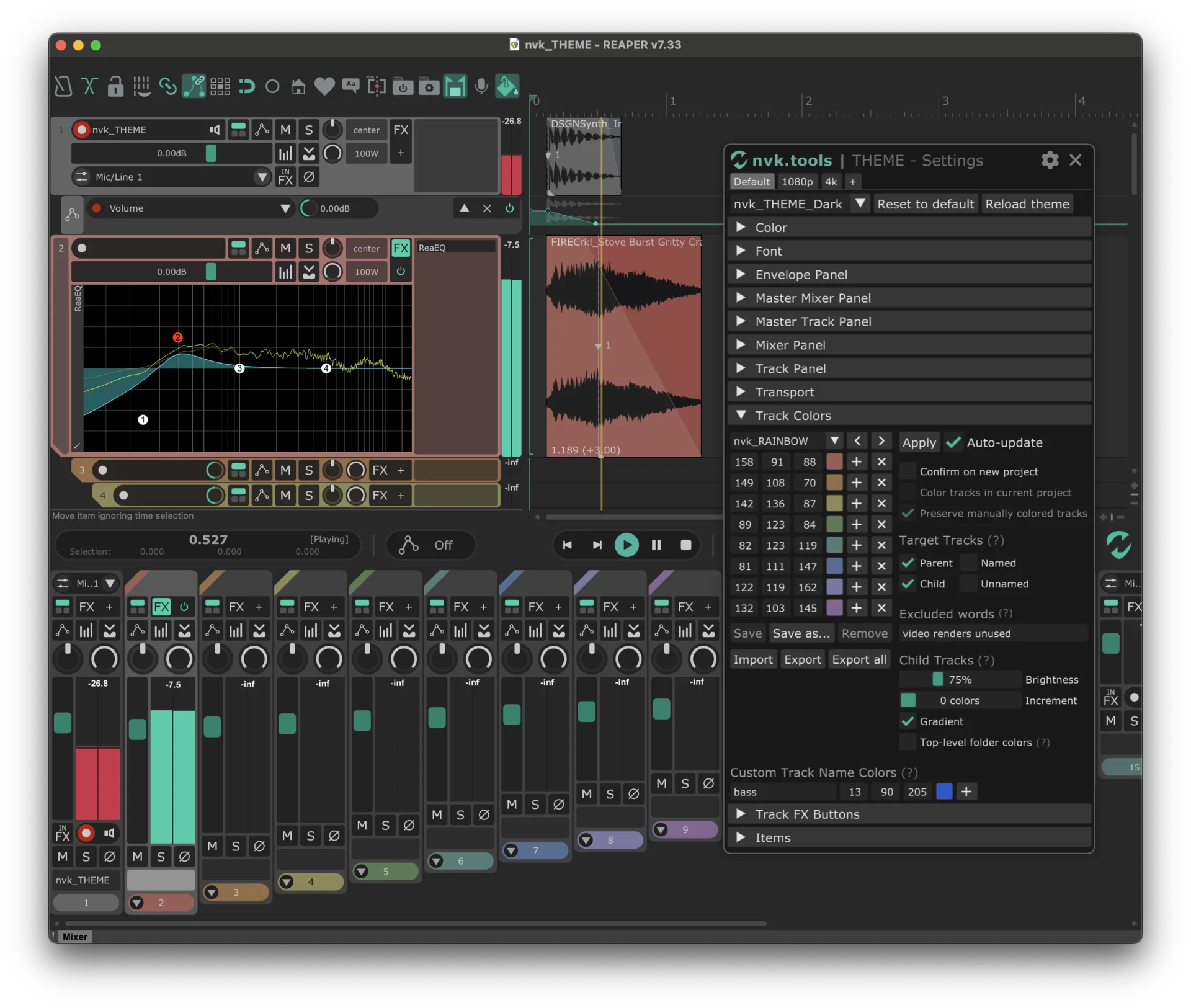
Track FX button
Assigned to ReaEQ, shown embedded in the track panel.
Track colors
Colored by folder with the Track Colors script.
Transport
Time display, automation mode, and play controls.
Mixer
Strips with FX buttons, colored to match their tracks.
Settings
nvk_THEME - Settings, on the Track Colors section.
How it works
-
Select the theme
Install it through ReaPack, then pick the version that matches the system theme in Options > Themes.
-
Configure it
Run nvk_THEME - Settings, or click the cog at the bottom right of the transport.
-
Color the tracks
Run nvk_THEME - Track Colors - Apply - Auto from a toolbar or at startup, or put the Manual version on a hotkey.
Features
Versions that match the system theme
Settings carry over between them.
Track colors by folder
Each parent track gets its own color and its child tracks take colors from it, at any folder depth.
Track FX buttons
Assign plug-ins to the FX buttons in the track panel and mixer. A button adds its plug-in, or toggles its window if the track already has it.
Transport buttons
Buttons for the project bay, rename, render, subprojects, track colors on and off, and the next or previous theme.
Channel output buttons
Switch the master track between stereo, quad, and surround outputs.
100%, 150%, and 200% layouts
HiDPI layouts for high-resolution monitors.
Settings
nvk_THEME - Settings configures the whole theme.
- Presets
- Tabs at the top, like one for a 1080p screen and one for 4K.
- Color and Font
- The theme's colors and font sizes.
- Panels
- Envelope Panel, Master Mixer Panel, Master Track Panel, Mixer Panel, Track Panel, and Transport.
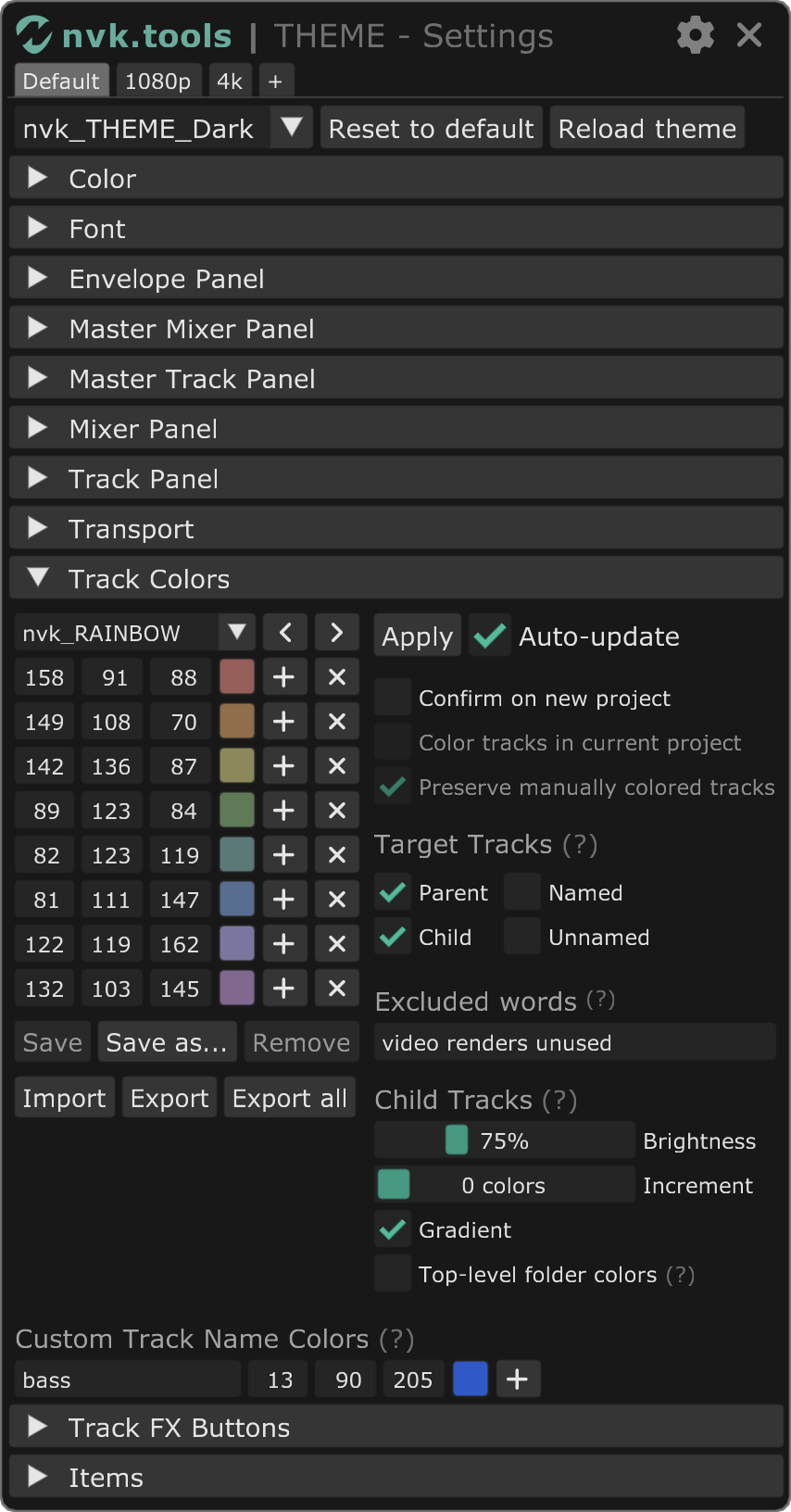
- Track Colors
- Color sets, which tracks get colored, excluded words, child track brightness and gradients, and colors by track name.
- Track FX Buttons
- Search for a plug-in and click to assign it. ReaEQ and ReaComp are the defaults.
- Reset
- Reset to default restores every setting. Right-click a slider to reset that value.
Video walkthrough
Reviews
By far the best third-party theme for Reaper I've seen so far. Works perfectly together with nvk_SEARCH, which has quickly become one of my favorite scripts for Reaper ever.
Looks and functions great. Also, really nice to be able to move the solo and mute buttons to the right <3
Absolutely brilliant. Comes packed with several features I've been wanting, while also giving Reaper the much needed facelift it deserves!
Really great theme! Clean, polished, professional, and very well designed. Everything feels carefully thought out, and the overall workflow is smooth and comfortable. You can really see the attention to detail.
Great work, guys - really enjoying it!
FAQ
Can I try it before buying?
Yes, for 14 days, no card needed. Install it with the install guide, run it in Reaper, and leave the license field blank when it asks.
Which versions of Reaper and which systems are supported?
Reaper 7 or later on macOS and Windows.
What is the difference between the Dark and Light versions?
Windows like the Actions list and routing window follow the system's light or dark mode. Pick nvk_THEME_Dark or nvk_THEME_Light to match it.
What do I need before installing?
Reaper, ReaPack, the SWS/S&M Extension, ReaImGui, and the js_ReaScript API. The theme and its scripts install through ReaPack, and the install guide covers each step.
Can I use my license on more than one computer?
Yes. Each license works on up to four computers at a time, all used by the same person.
Can I buy licenses for a team?
Yes. Pick the number of people in the team license option at the bottom of this page for one multi-user key. Questions? Email support@nvk.tools.
nvk_THEME
Includes the settings and track color scripts. Try it free for 14 days.
Purchases go through Gumroad.com
Buying for a team? Choose how many people need it for one multi-user key. Each person can use it on up to four of their own computers. Regular price $19, now $19 per license.